Metronome Map 2

Your entire live show.
In your pocket.

Click tracks. Backing tracks. Tempo maps. Voice cues. Multi-stems.

No DAW. No laptop. Just play.

  • Free to start
  • Works offline
  • English & ไทย
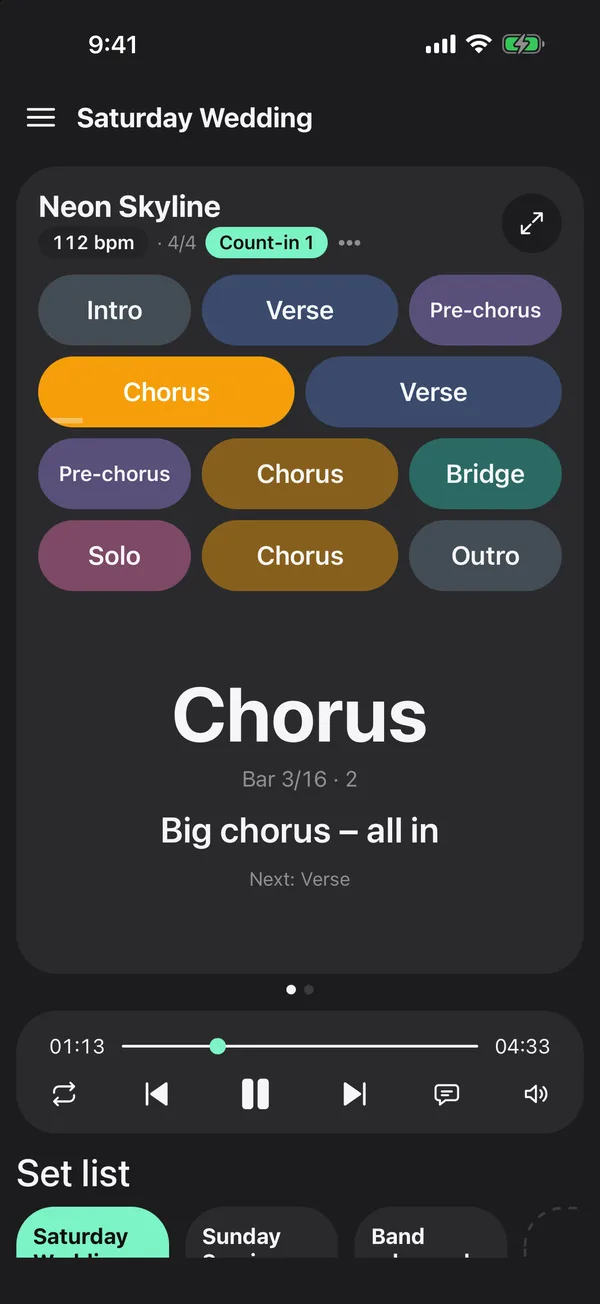
Metronome Map 2 home screen playing a song: sections, current bar, cue, set list
Everything for the stage

One app instead of a laptop rig

Click tracks

A click that follows every section and odd bar.

Backing tracks

AI splits your audio into vocals, drums, bass and other.

Tempo maps

Map the whole song once — sections, bars, count-ins.

Voice cues

Spoken cues two bars early, “1-2-3-4” on the bar.

Multi-stem mixer

Level, mute and solo every stem in real time.

Separate outputs

Click to your in-ears, band to front of house.

Set lists

Play song to song on the beat, hands-free.

Handwritten notes

Write on charts that zoom to the bar you need.

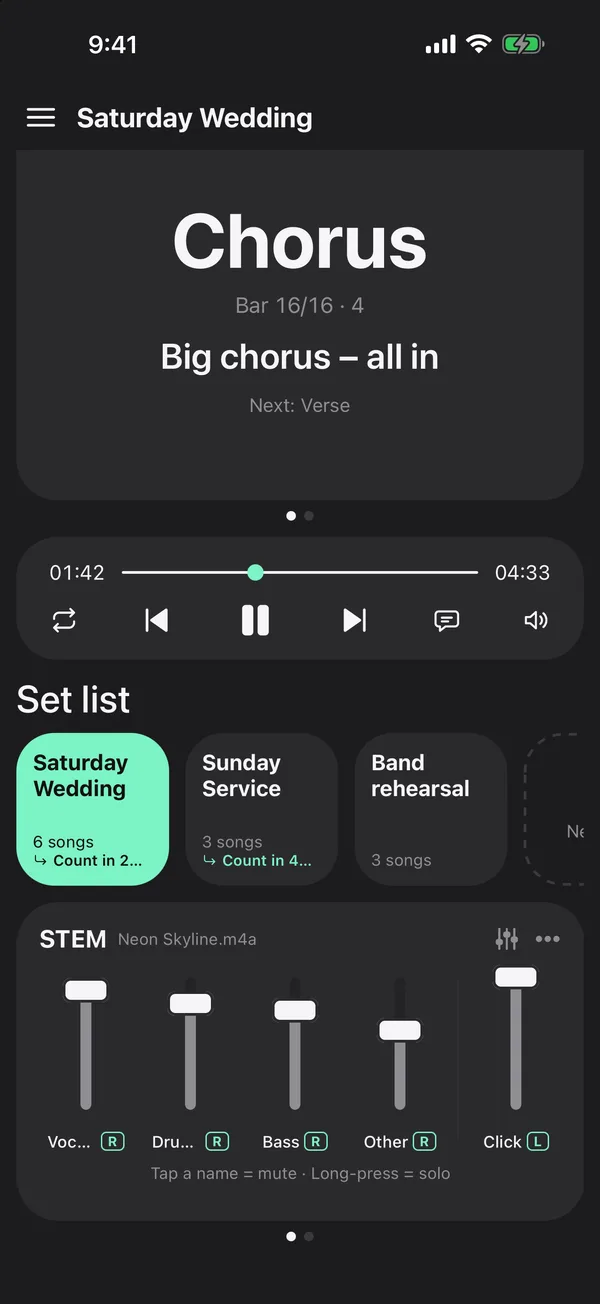
STEM card with vocals, drums, bass, other and click faders
Backing tracks

Turn songs into backing tracks.

Import your own recording. AI finds the beat grid and splits it into vocals, drums, bass and other — mute your part and play along with the rest.

  • Export a stereo WAV backing track (Pro)
  • Prefer no AI? Tap along to set the grid yourself
  • YouTube songs: tap along to the video to set the beat
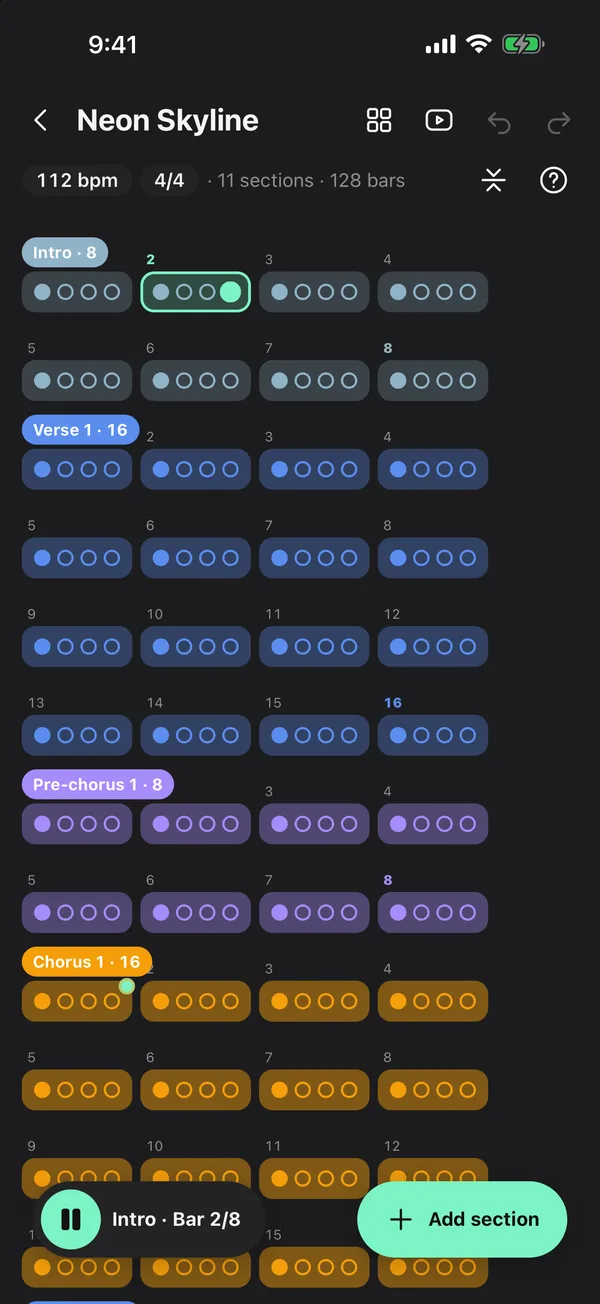
Song map editor with every section and bar, current bar highlighted
Tempo map

Clicks that follow your song.

Lay out intro, verse, chorus and bridge with your fingers. Odd bars just work — the click follows the real grid of the song.

  • Tap any section to start there with a count-in
  • Loop the hard part, A–B on the fly
  • Every click scheduled ahead — no drift
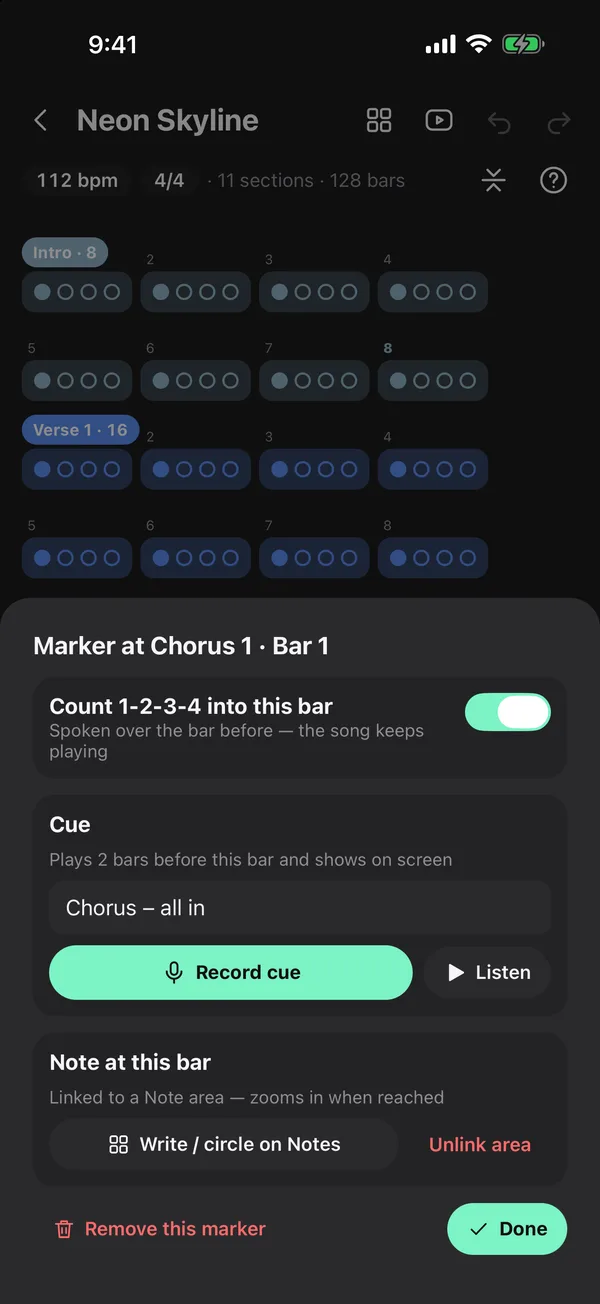
Marker sheet with count-in toggle and a spoken cue
Voice cues

Never miss your cue.

Mark any bar. A spoken cue plays two bars early, then “1-2-3-4” counts you in right on it.

  • Type a cue and the app reads it out
  • Or record your own voice
  • Mute cues on the fly from the transport bar
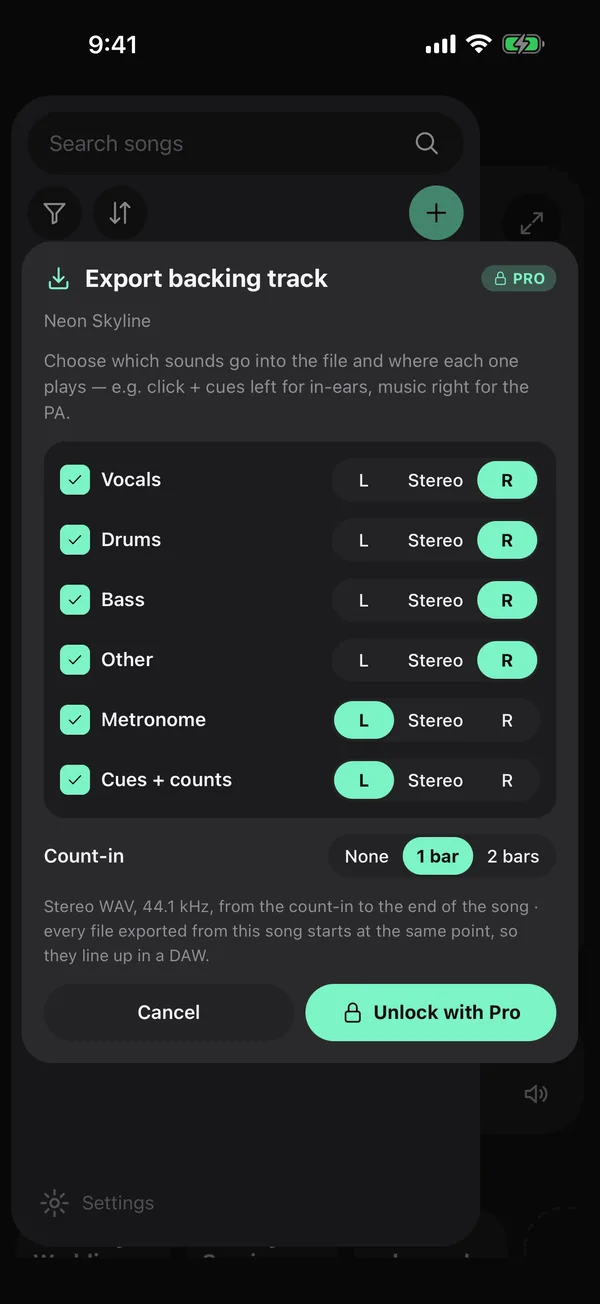
Export sheet: stems on the right, metronome and cues on the left
Separate outputs

Route audio like a pro.

Send each sound left, right or stereo: click and cues to your in-ears, the band to front of house — with a simple stereo split cable or an audio interface.

  • Per-stem pan in the mixer
  • Same routing in exported backing tracks
  • No laptop in the signal chain
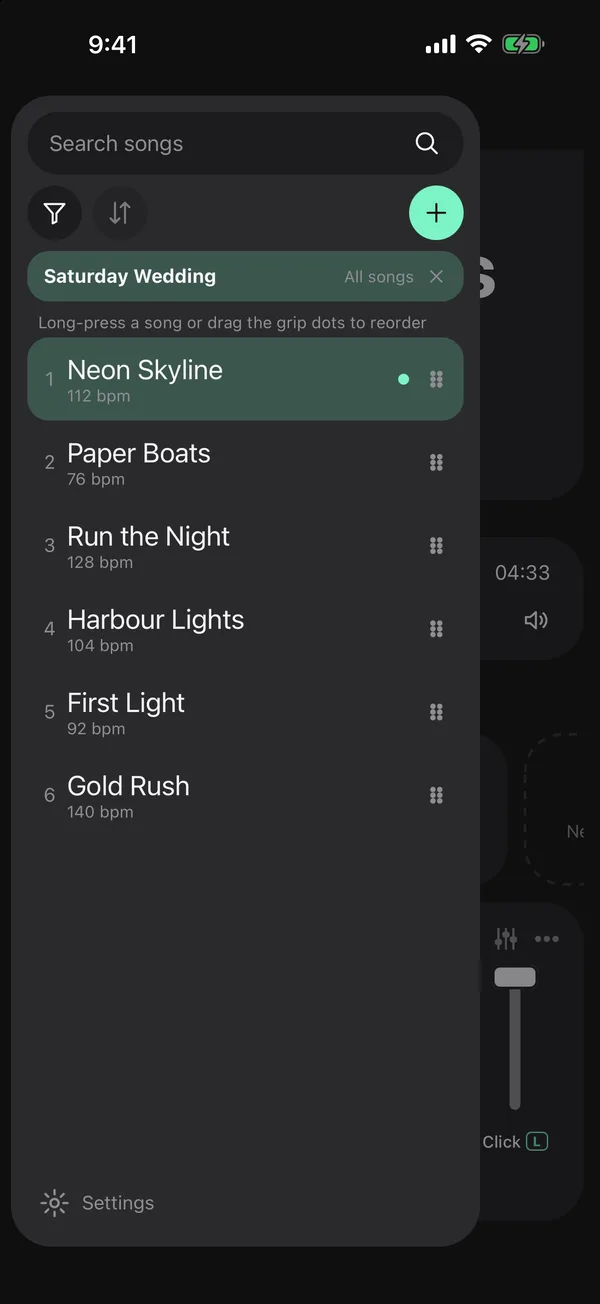
Set list with songs in show order and drag handles
Set lists

Your entire set. One tap.

Build the show, drag to reorder and choose what happens between songs. The next song starts on the beat.

  • Wait, go straight in, or count in 1–8 bars
  • Share a set with your band by link
  • Works offline on stage
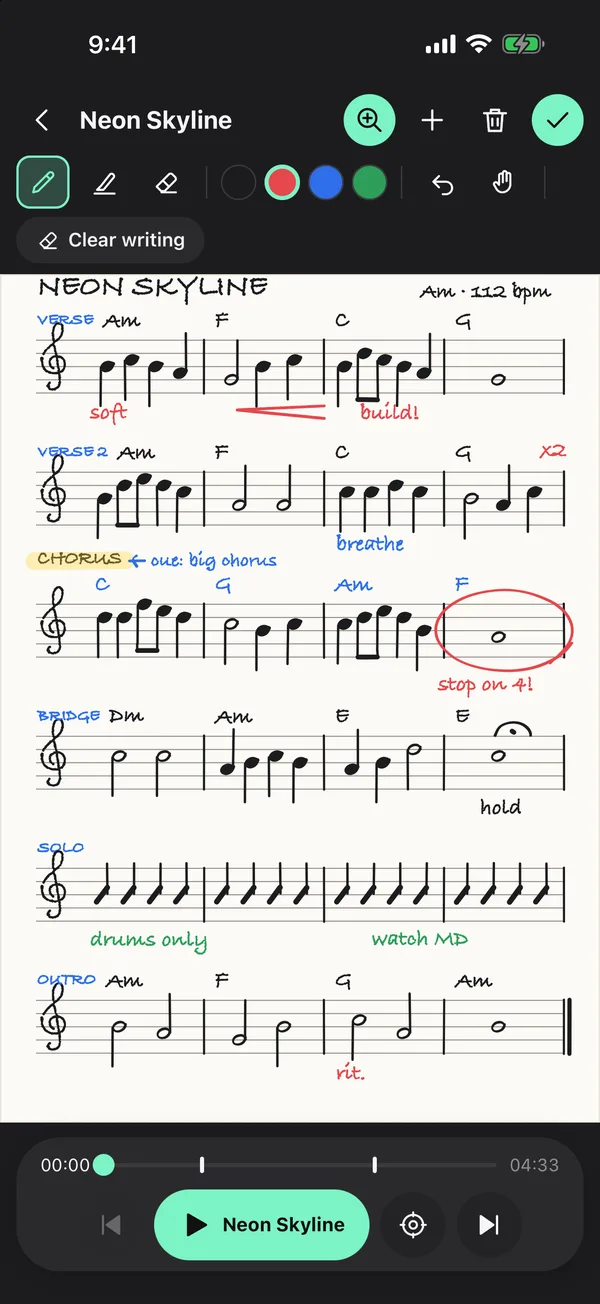
Handwritten notes with music notation on staff paper, a bar circled in red
Handwritten notes

Write it down. See it on cue.

Write freely with Apple Pencil or your finger — words, chords and music notation — and link any spot to the bar you need to remember.

  • Blank, lined or staff paper, or a photo of your chart
  • The page zooms to your note one bar before
  • Pen, highlighter and colours
How it works

From song to stage in three steps

Add a song

Import audio, type a tempo or paste a YouTube link to tap along.

Map it once

Sections, bars, cues and notes — or let AI draft the grid and stems.

Play the set

Tap a section, loop the hard part, then run the whole show.

Pricing

Free to play. Pro for the whole show.

Free
$0
forever
  • Unlimited songs, maps, cues, notes and set lists
  • Full metronome, mixer and routing
  • Full-song AI for 1 song a month
  • One short ad at launch, only in months you use AI
Pro
$4.99
per month · or $39.99 a year · 7-day free trial on the App Store
  • Everything in Free
  • Full-song AI beat grid and stems · 30 songs a month
  • Export backing tracks
  • No ads · top up 10 songs any time

US prices shown; your store shows local pricing. Invite a friend: when they run AI for the first time you get 10 full songs free.

FAQ

Questions

Can I run click tracks and backing tracks live without a laptop?

Yes. Metronome Map 2 plays the click, count-ins, voice cues and your backing-track stems from a phone or tablet. Pan the click and cues to one side and the band to the other, then use a stereo split cable or an audio interface to send the click to your in-ears and the backing tracks to front of house — no laptop or DAW in the chain.

How do I turn a song into a backing track?

Import your own audio file. AI separates it into vocals, drums, bass and other on the song’s beat grid. Mute the part you play and practise or perform with the rest, or export a stereo WAV backing track with the click and cues on their own side (Pro).

What is Metronome Map 2?

Metronome Map 2 is a metronome app by PM Technology that follows the structure of a whole song. You map the sections and bars once, and the click, count-ins, spoken or recorded cues and note pages all follow that map in rehearsal and on stage.

Is Metronome Map 2 free?

Yes. The metronome, song maps, cues, notes and set lists are free forever. AI works on 1 whole song a month for free. Pro costs US$4.99 a month or US$39.99 a year and adds full-song AI for 30 songs a month with no ads.

Can it handle odd bars and time signature changes?

Yes. Set the song’s time signature, then add odd bars wherever the song changes, such as a 2/4 pickup or a 6/4 turnaround. The click follows the real grid of the song instead of a fixed count.

Is Metronome Map 2 on iPhone and Android?

It is out now on Google Play for Android phones and tablets. On iPhone and iPad it is in beta on TestFlight, with the App Store release coming soon.

Can I use songs from YouTube?

Yes. Paste a YouTube link and the video opens in the official YouTube player inside the app. Tap along with the video to set the beat yourself and add sections while it plays; when you practise, the video then follows the click. The beat is not detected automatically for YouTube and the app never downloads YouTube audio — AI beat detection and stems work on audio files you own.

Which files can I attach?

mp3, m4a, wav, flac, aac, ogg, aiff, mp4 or mov, up to 150 MB. Uploaded audio is processed on our server and deleted within 30 days; results are stored on your phone.

Does the click stay in time with the stems?

Yes. Click and stems run on the same audio clock and every click is scheduled ahead of time, so there is no drift.

Can I use it offline?

Everything except the AI features works offline, including stems you already downloaded.

How do I cancel Pro?

In your Apple ID or Google Play subscriptions. Pro stays active until the end of the paid period.

Your next show starts here.

Free on Android. Beta on iPhone and iPad.