How to use a metronome — from the first click to whole songs
To use a metronome, set the tempo (BPM) of the piece, choose how many beats are in a bar and accent beat 1, then play so your notes land exactly on the clicks. Start 10–20% slower than the target tempo and speed up by a few BPM only when you can play the passage cleanly three times in a row.
1. Set the tempo (BPM)
BPM means beats per minute. If you don't know a song's tempo, tap along with the recording on a tap-tempo button: four or more taps give a reliable average. Rough guide:
- Slow ballads: about 60–80 BPM
- Most pop and rock: about 90–130 BPM
- Punk, drum & bass and fast metal: 150 BPM and up
2. Set the beats per bar and the accent
The time signature tells you how many beats are in a bar. In 4/4 there are four, in 3/4 (a waltz) three, and in 6/8 you usually feel two big beats of three eighth notes each.
Accent beat 1 so you always know where the bar starts. Once you are steady, mute a beat or two to test your own inner clock.
3. Add subdivisions
Subdivisions fill the gaps between beats with eighth notes, triplets or sixteenths. They keep fast runs and slow grooves even. Practise with subdivisions on, then turn them off and check that the passage still feels the same.
4. Practise slow to fast
- Find the hardest two to four bars.
- Play them at a tempo where they are clean, even if it is very slow.
- Play them three times in a row without a mistake.
- Raise the tempo by 2–5 BPM and repeat.
- Stop when it gets sloppy. Next session, start a little below yesterday's best.
5. Odd time signatures and tempo changes
Real songs don't always stay in one time signature. A 2/4 bar before the chorus, a 7/8 riff or a 6/4 turnaround throws off a basic metronome, which repeats the same bar forever.
For these songs you need a metronome that follows a song map — the list of sections and bars — so the click goes where the song actually goes. Without special tools, count the odd bar out loud; with a song-map metronome you mark it once and it is right every time.
Use the metronome in Metronome Map 2
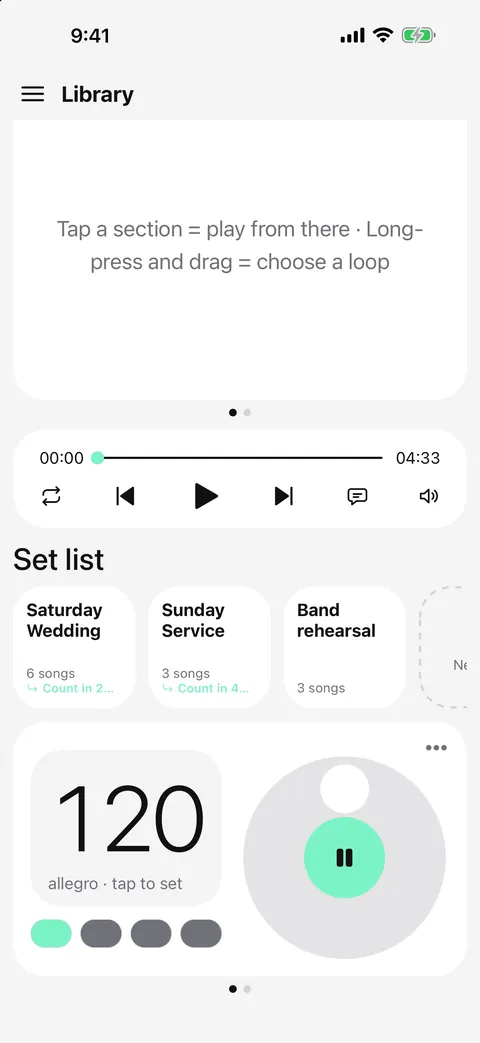
Metronome Map 2 has a classic metronome on its home screen, and a song map for whole songs.
- Turn the dial to set the tempo, or tap along to find the BPM. Tap the centre to start and stop.
- Tap a beat to cycle it: accent → normal → mute. Choose any number of beats per bar with quarter, eighth, triplet or sixteenth subdivisions.
- For a whole song, create a song and lay out its sections. Pinch to add or remove bars and add odd bars, like a 2/4 pickup, wherever the song needs them.
- Tap any section to start there with a count-in, or long-press and drag across sections to loop the hard part.
Questions
What BPM should I practise at?
Start at a tempo where you can play the passage cleanly three times in a row — often 10–20% slower than the recording — then raise it 2–5 BPM at a time.
Should I accent beat 1?
Yes, while you are learning. An accent on beat 1 shows where each bar starts, which matters most in odd time signatures and after long rests.
Can a metronome follow time signature changes?
A basic metronome repeats one bar forever, so it can't. A song-map metronome such as Metronome Map 2 lets you add bars of different lengths, so the click follows the song's real structure.
Is a metronome app as steady as a hardware metronome?
A good app schedules every click ahead of time on the audio clock, so it is just as steady. Metronome Map 2 works this way, so there is no drift even with stems playing.

Try it in Metronome Map 2
The metronome that follows your song: song map, cues and count-ins, AI beat grid and stems, notes that zoom and set lists. Free on Android; iPhone and iPad beta on TestFlight.