How to export a click and backing track as one WAV file
To export a click and backing track, choose which tracks go in the file — stems, the click, the spoken cues — pan each one left, stereo or right, add a count-in, and render it to a single stereo WAV. With the click and cues on the left and the band on the right, the file plays on any device and splits cleanly into in-ears and front of house.
Why export to a file?
- Play the track on a backup device, a hardware player or a DAW.
- Send a rehearsal track to band members who don't use the app.
- Keep a version that sounds exactly the same every night.
Choose the layout
- Live split: click + cues left, band right.
- Rehearsal mix: everything stereo, your part muted.
- Drummer mix: drums muted, click and cues in the middle.
Check the file
- Listen to the count-in and the first bar.
- Check the last bar ends cleanly.
- Play it through the real split cable before the gig.
Export a backing track in Metronome Map 2 (Pro)
- Press and hold a song in the library → “Export backing track”.
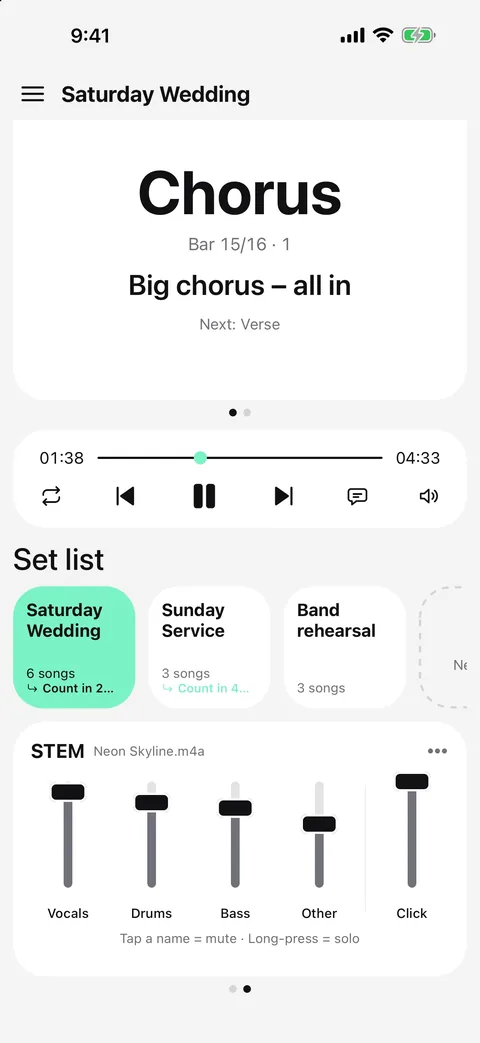
- Pick the tracks: each stem (or the attached song), the metronome, and cues with count voice.
- Set each track to L, Stereo or R — it starts from your mixer settings — and a count-in of 0, 1 or 2 bars.
- Export: you get a 44.1 kHz stereo WAV to save to Files, AirDrop or share. Typed cues are spoken into the file, on the beat.
Export is part of Pro. Free users can open the export sheet and see every option.
Questions
What format is the export?
A stereo WAV at 44.1 kHz, which every player and DAW can open.
Are spoken cues included?
Yes, both recorded and typed cues, placed on the same beats as in the app.
Do the stems stay in sync with the click?
Yes. Every track is rendered from the same beat grid, so they line up to the sample.
Can I export YouTube songs?
No. Exports are only for audio files you own.

Try it in Metronome Map 2
The metronome that follows your song: song map, cues and count-ins, AI beat grid and stems, notes that zoom and set lists. Free on Android; iPhone and iPad beta on TestFlight.