How to play along with your own songs with a click
To play along with your own songs, import the audio file into a practice app, give it a beat grid — by tapping along or with AI beat detection — and play it with a click. The click then follows the song, so you can loop sections, slow down and come in on a count-in. Use files you own: your demos, rehearsal recordings, purchased downloads or CD rips.
Where your songs can come from
- Files: mp3, m4a, wav, flac, aac, ogg, aiff — or the audio of an mp4 or mov video.
- iPhone Music library: songs you bought on the iTunes Store or ripped from CD. Apple Music streaming tracks are copy-protected and can't be imported by any app.
- Your own recordings: a rehearsal or a demo is the best practice track there is.
Tap along or use AI?
Tapping along is free and quick when you only need the click. AI also finds the sections and splits the song into stems, so you can mute your part. Both give the song a beat grid.
Practise with it
- Map the sections so you can jump to the part you need.
- Loop the hard bars and slow them down.
- Mute your part if the song has stems.
- Play the whole song at full speed with the click.
Bring your songs into Metronome Map 2
- Tap + and choose an audio file, or “Song from Music library (iTunes)” on iPhone.
- Choose AI (beat grid, sections and stems) or attach without AI.
- Without AI, tap along on every beat; adjust beat 1 on the waveform.
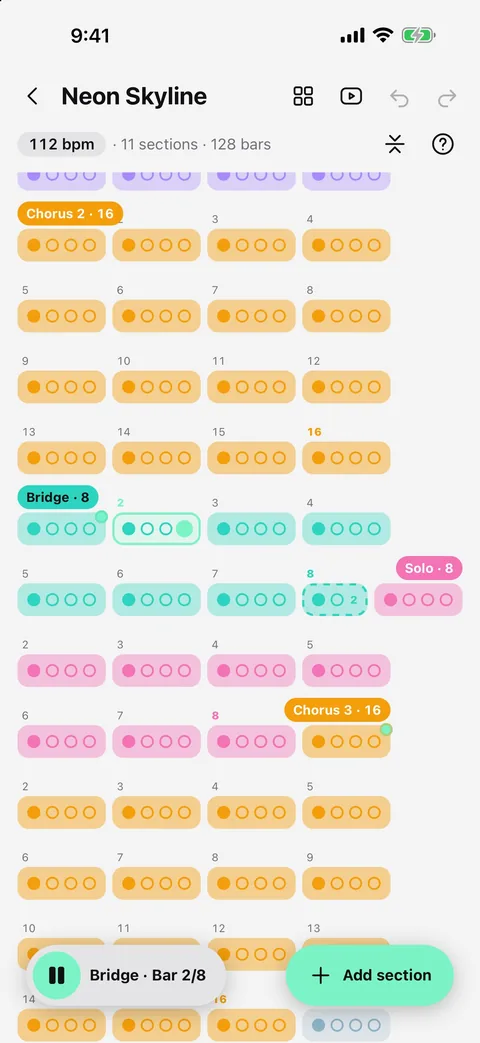
- Lay out the sections while you listen: play the file and tap “Add section here” as each part starts, and “End here” on the last bar.
- Play: the song, click, count-in and cues run together.
The Music library picker shows only songs that can be imported and needs a real iPhone (not the simulator). Android uses the file picker.
Questions
Can I import Apple Music songs?
No. Apple Music streaming tracks are copy-protected. You can import songs you bought on the iTunes Store or ripped from your own CDs.
Do I need AI to play along with a click?
No. Attach the file without AI and tap along to set the beat; it's free and unlimited.
Which file types work?
mp3, m4a, wav, flac, aac, ogg, aiff, and the audio of mp4 or mov files, up to 150 MB for AI.
Is my music uploaded anywhere?
Only if you choose AI, which sends the file to process it. Attaching without AI keeps the file on your phone.

Try it in Metronome Map 2
The metronome that follows your song: song map, cues and count-ins, AI beat grid and stems, notes that zoom and set lists. Free on Android; iPhone and iPad beta on TestFlight.