How to make a simple backing track from a song
The quickest way to make a simple backing track is stem separation: an AI tool splits a recording into vocals, drums, bass and other instruments, and you mute the part you want to play yourself. Mute the vocals for a karaoke or minus-one track, the drums to drum along, or the bass to practise bass lines.
What is a backing track?
A backing track is a recording of a song with one or more parts missing, so you can play or sing those parts live. Singers call it a minus-one or karaoke track, drummers want a drumless track, and worship teams and function bands often play with backing tracks and a click in their ears.
Three ways to make one
- Stem separation (easiest): AI splits a finished recording into stems and you mute the ones you don't want. It takes a minute and needs no music software.
- Record it yourself: record chords on guitar or piano over a click in any recording app, then play the melody on top.
- Multitracks: some songs are sold as separate tracks. The quality is perfect, but only for songs released that way.
Step by step with stem separation
- Choose a recording you own or have the right to use — your own demo, a rehearsal recording or a purchased file.
- Run stem separation to get vocals, drums, bass and other.
- Mute or turn down the part you will play.
- Add a click on the same clock so you stay locked to the track.
- Loop the hard section until it is solid, then play the whole song.
Tips for a better practice track
- Leave the original part in quietly at first, then fade it out as you learn it.
- Use a count-in so you come in on beat 1, not halfway through a bar.
- Mark the sections (verse, chorus, bridge) so you can jump straight to the part you need.
- Only use audio you own or are allowed to use, and keep practice tracks for practice.
Make a backing track in Metronome Map 2
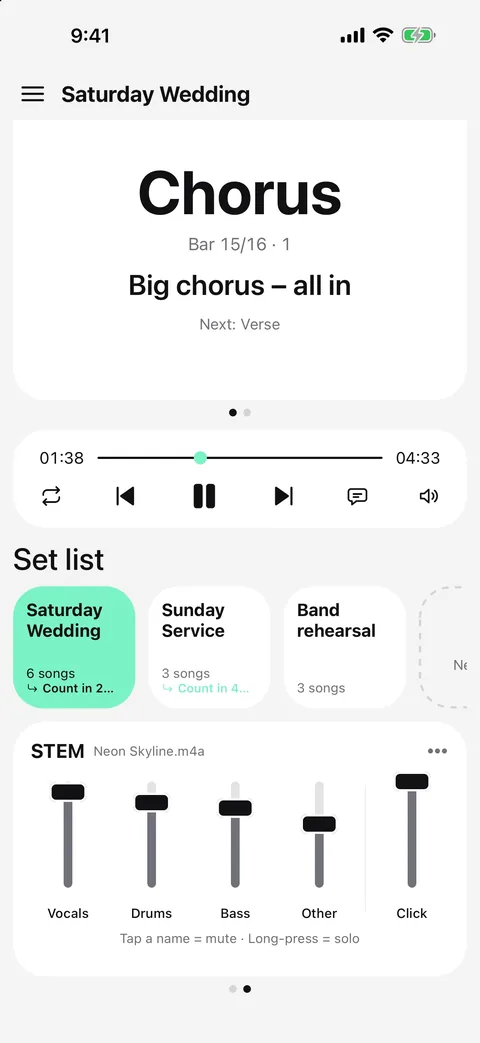
Metronome Map 2 separates your own recording into stems and plays them against a click on the same audio clock, so nothing drifts.
- Create a song and attach your own audio file (mp3, m4a, wav, flac, aac, ogg, aiff, mp4 or mov, up to 150 MB).
- Let AI find the beat grid, downbeats and sections and split the track into vocals, drums, bass and other.
- In the stem mixer, turn down the part you want to play. The click stays in time with the stems.
- Tap a section to start there with a count-in, or loop it until you've got it.
Free: AI on 1 whole song a month. Pro: 30 songs a month, no ads.
Questions
Can I make a backing track from a YouTube video?
Not a backing track — the app never downloads or analyses YouTube audio, so AI stems work on audio files you own. You can still practise with YouTube songs: open the clip in the app, tap along to set the beat yourself, and the video then plays in time with the click.
Is a karaoke track the same as a backing track?
A karaoke or minus-one track is a backing track without the lead vocal. The same method works for any part: drums, bass, guitar or keys.
How clean is AI stem separation?
It is clean enough for practice, but you may hear faint traces of the removed part. Check the result before using it on stage.
Is it free?
Metronome Map 2 separates 1 whole song a month for free. Pro (US$4.99 a month or US$39.99 a year) separates 30 songs a month.

Try it in Metronome Map 2
The metronome that follows your song: song map, cues and count-ins, AI beat grid and stems, notes that zoom and set lists. Free on Android; iPhone and iPad beta on TestFlight.