How to run a live set from your phone
To run a set from your phone, put the songs in order in a set list, decide what happens between songs — stop and wait, segue straight in, or count in a number of bars — and send the click and cues to in-ear monitors. A set-list app that preloads the next song can start it exactly on the beat after the last one ends, so medleys and segues sound tight with no gap.
Plan the transitions
- Stop and wait: for talking to the crowd, tuning or a change of instrument. The next song starts when you press play.
- Segue: the next song starts on the beat right after the last one ends — for medleys and worship sets.
- Count in: a fixed number of bars at the next song's tempo, so the band hears the new tempo before it starts.
Before the show
- Run the whole set once with exactly the cues and count-ins you'll use.
- Check every song's first and last bar.
- Charge the phone, turn on Do Not Disturb and lock the screen orientation.
- Send the click to in-ears only (see click in in-ears, band to the PA).
Sharing a set with the band
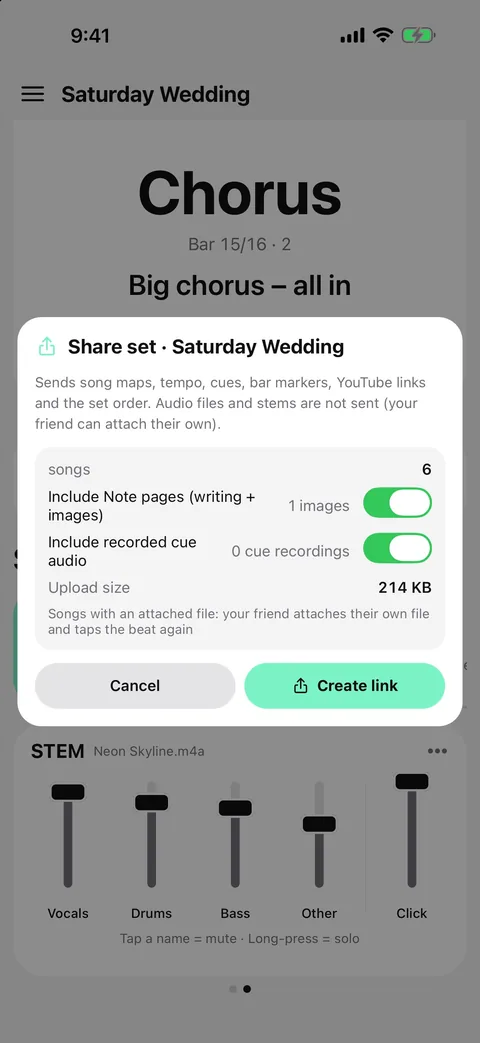
Everyone should rehearse to the same map: the same tempos, the same bar counts, the same cues. Sharing a set as a link sends the structure, cues and notes so everyone's copy matches.
Set lists in Metronome Map 2
- Create a set list and add songs; press and hold, then drag to reorder.
- Long-press the set → “Between songs”: stop and wait for Next, straight into the next song, or count in 1, 2, 4 or 8 bars.
- “First song” sets the count-in before the first song: none, 1, 2, 4 or 8 bars.
- With “Straight into next song”, the next song is prepared during the last seconds of the current one and starts exactly on the beat.
- Share the set as a link: bandmates get every song map, tempo, cue and marker, plus recorded cues and note pages if you include them. Links last 30 days; audio files are not shared.
Questions
Can songs play back to back with no gap?
Yes. Choose “Straight into next song” between songs: the next song is prepared in advance and starts on the beat after the last one ends.
Can I count in at the new song's tempo?
Yes. Choose a 1-, 2-, 4- or 8-bar count-in between songs; it plays at the next song's tempo.
Does sharing a set send my audio files?
No. A shared set includes song maps, tempos, cues, markers, YouTube links and optionally recorded cues and notes — not your audio files or stems.
Does the notes view follow the set?
Yes. In Notes the set carries on to the next song with the same between-song setting.

Try it in Metronome Map 2
The metronome that follows your song: song map, cues and count-ins, AI beat grid and stems, notes that zoom and set lists. Free on Android; iPhone and iPad beta on TestFlight.