How to make a click track for a whole song — no DAW needed
To make a click track for a song, write down its form — each section and how many bars it has — set the tempo and time signature, then build the click bar by bar so it starts and stops with the song. A song-map metronome such as Metronome Map 2 does this on a phone: you lay out the sections, pinch to set the bar counts, and the click follows the song from count-in to last bar, odd bars included.
What a click track is (and why a plain metronome isn't one)
A click track is a metronome that knows the song: it counts in, runs for exactly as many bars as the song has and stops at the end. Bands use one so the drummer, the tracks and the in-ear mixes all agree on the tempo.
A plain metronome repeats one bar forever. That is fine for practice, but it can't tell you where the chorus starts, skip a 2/4 bar or stop on the last beat.
1. Write down the song form
Listen once and count bars. Most songs are built from four- and eight-bar blocks, so a typical map looks like this:
- Intro 4 · Verse 8 · Pre-chorus 4 · Chorus 8
- Verse 8 · Pre-chorus 4 · Chorus 8
- Bridge 4 · Chorus 8 · Outro 4
Note every bar that doesn't fit the pattern: a 2/4 bar before the chorus, a 6/4 turnaround, a held chord. Those are the bars that break a normal metronome.
2. Set the tempo and time signature
Find the BPM (see how to find the BPM of a song) and the time signature — 4/4 for most pop and rock, 3/4 or 6/8 for waltzes and ballads in three. If the recording speeds up or slows down, a fixed BPM will drift; use a click that follows the recording's beat grid instead (see click track that follows a recording).
3. Build it and check it
- Enter the sections in order with their bar counts.
- Add the odd bars exactly where they fall.
- Add a count-in before bar 1.
- Play it against the recording from start to end — the last click should land on the last chord.
- Add cues (“Chorus”, “Last time”) once the structure is right.
Make a click track in Metronome Map 2
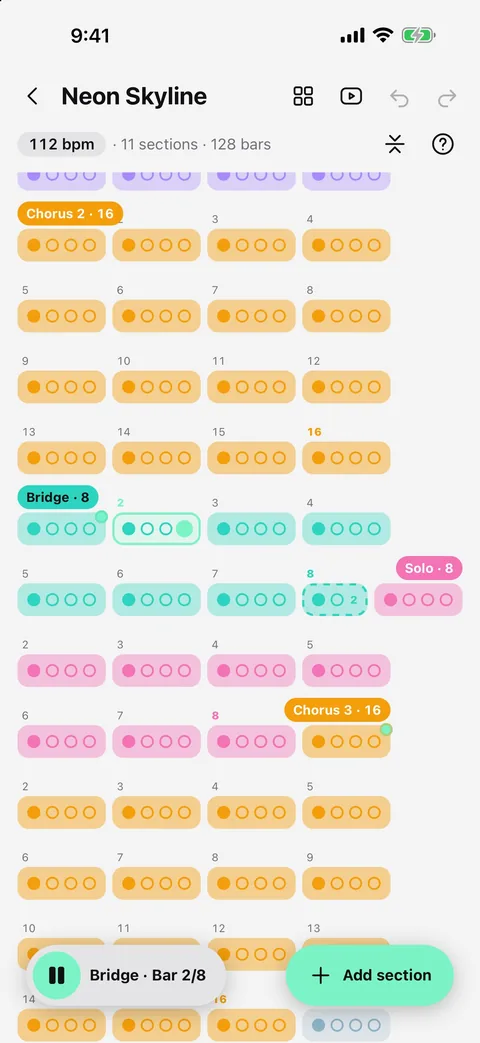
Every song in Metronome Map 2 is a song map: a row of bars grouped into sections. The click, count-ins, cues and notes all follow it.
- Create a song, set the BPM, and tap the 4/4 label to choose the time signature.
- Tap “Add section” to add Intro, Verse, Chorus and so on — or give a section your own name.
- Spread or pinch two fingers on the bars to add or remove bars. Swipe up with two fingers on a bar to make it an odd bar, such as 2/4.
- Long-press a section label and drag to move where the section starts; double-tap a label to remove it. Undo puts anything back.
- Press play: the click counts in, follows every section and stops on the last bar.
Tip: if you have the recording, the app can lay out the sections for you while you listen — tap “Add section here” as each part begins.
Questions
Do I need a DAW to make a click track?
No. A DAW is one way, but a song-map metronome app lets you build a click track for a whole song on your phone in a few minutes, and play it live from the same phone.
How do I handle a bar of 2/4 in a 4/4 song?
Add it as an odd bar exactly where it falls. In Metronome Map 2 you swipe up with two fingers on that bar to make it an odd bar; the click then counts two beats there and carries on in 4/4.
Can the click change time signature mid-song?
Yes. Each bar can have its own number of beats, so a 7/8 riff or a 6/4 turnaround is just a bar of a different length on the map.
Can I add spoken cues to the click track?
Yes. Mark the bar and type or record a cue; it plays two bars early with a 1-2-3-4 count into the change. See the guide to song cues and count-ins.

Try it in Metronome Map 2
The metronome that follows your song: song map, cues and count-ins, AI beat grid and stems, notes that zoom and set lists. Free on Android; iPhone and iPad beta on TestFlight.