How to take notes on sheet music and chord charts
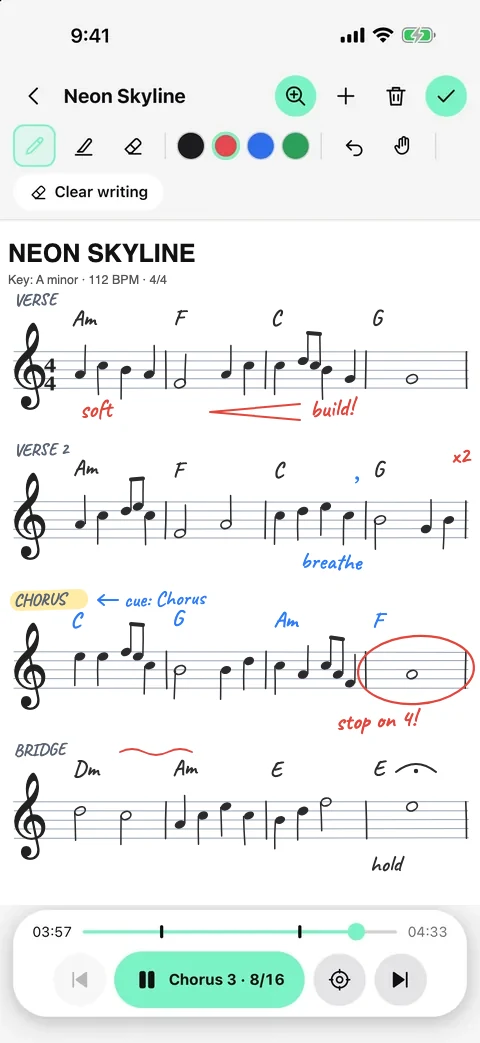
Good music notes are short, placed exactly where you need them and readable at a glance: mark the chords or rhythm, the dynamics and the one thing you keep forgetting, right at that bar. On a phone or tablet, write with a stylus or your finger on staff or lined paper, or photograph your printed chart and write on top.
What to write down
- The song form: intro, verse, chorus, bridge — and how many bars each one has.
- Chords or a simple rhythm for the hard parts.
- Dynamics and feel: “soft”, “build”, “half-time”, “stop on 4”.
- Cues from the band leader: who starts, who ends, how many times round.
- The one mistake you keep making, so you see it before it happens.
Paper or digital?
Paper is quick but easy to lose and hard to read on a dark stage. A phone or tablet keeps every chart with its song, works in the dark and can show the right page automatically. A stylus on staff paper feels close to pencil and paper; for chord charts, lined or blank paper is usually enough.
Make notes you can read on stage
- Write big — one idea per line.
- Use colours for sections or for parts (vocals, drums).
- Put each note on the bar where you need it, not at the top of the page.
- Photograph printed charts and mark them up instead of retyping them.
- Review your notes at rehearsal and delete the ones you no longer need.
Notes that follow the song in Metronome Map 2
In Metronome Map 2 notes belong to the song map, so the right page shows up at the right bar.
- Open Notes and write with a stylus or your finger on blank, lined or staff paper — or add a photo of your chart.
- Triple-tap a bar on the song map to pin a note page to it.
- Pin a note frame to a bar and the page zooms there one bar before it arrives.
- Swipe through a set list; every song keeps its own notes.
Questions
Can I write on a photo of my chart?
Yes. In Metronome Map 2 you can add a photo of your chart and write on top of it with a stylus or your finger.
Do I need a stylus?
No. A stylus feels most natural, but you can write with your finger too.
Will my notes show up on stage at the right time?
Yes, if you pin them to bars. A pinned note frame zooms into view one bar before that bar arrives.
Can I share notes with my band?
When you share a set list as a link you can include your note pages; bandmates get them with every song map, tempo and cue.
Try it in Metronome Map 2
The metronome that follows your song: song map, cues and count-ins, AI beat grid and stems, notes that zoom and set lists. Free on Android; iPhone and iPad beta on TestFlight.