How to add cues and count-ins to a song
A song cue is a short spoken or recorded prompt — such as “Chorus”, “Bridge” or “Last time” — that plays a bar or two before a new section, and a count-in is the “1-2-3-4” that leads into it. Together they tell everyone what's coming next, so the band changes sections together without looking at each other.
Why bands use cues
Nobody can read a set list in the middle of a song, and in-ear monitors cut you off from the room. A cue in the click tells drummers, singers and the music director exactly what happens next. Worship teams, function bands and anyone playing with tracks use cues every week.
Plan your cues
- Name the section that is coming, not the one you're in: “Verse 2”, “Chorus”, “Bridge”, “Outro”.
- Add instructions that change the arrangement: “Break”, “Build”, “Drums only”, “Last time”, “Hold”.
- Place each cue one or two bars before the change so there is time to react.
- Keep cues short — one or two words is plenty.
Count-ins
A count-in is a bar of clicks, often with a spoken “1, 2, 3, 4”, that leads into the first beat. Use one at the start of a song, after a stop, and when you jump into the middle of a song to rehearse a section. At slow tempos one bar is enough; at fast tempos two bars help everyone settle.
Running a click with cues live
- Send the click and cues only to in-ear monitors, never to the front-of-house speakers.
- Set the cue volume a little above the click so it cuts through.
- Decide what happens between songs: stop and wait, go straight into the next song, or count in.
- Rehearse with exactly the cues you'll use on stage.
Add cues in Metronome Map 2
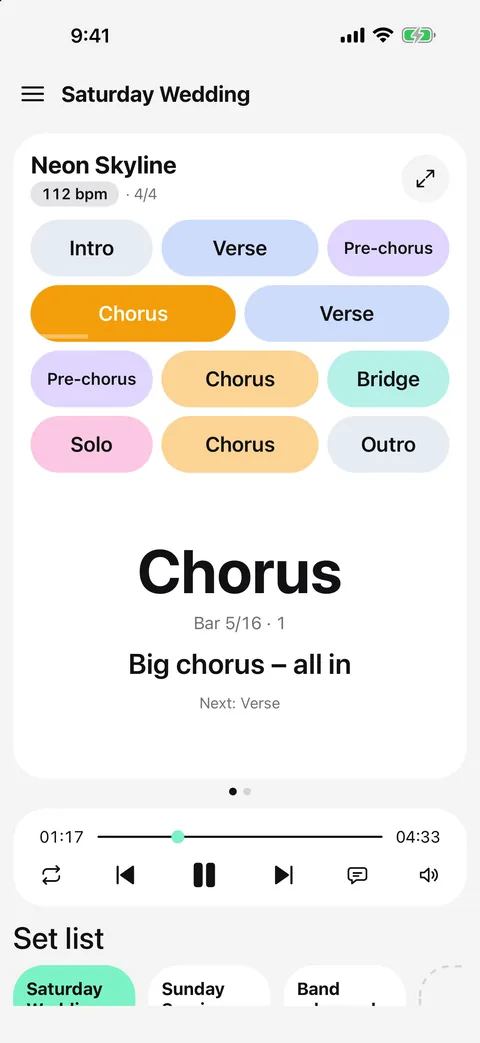
In Metronome Map 2 cues are attached to bars on the song map, so they always arrive at the right moment.
- Lay out the song's sections, then mark the bar where something changes.
- Type a cue and the app reads it out, or record your own voice.
- The cue plays two bars early and the “1-2-3-4” count-in lands exactly on the marked bar.
- Press and hold the cue button on the player bar to set how loud cues are, and choose a 1-, 2- or 4-bar count-in for when you tap a section.
- Put songs in a set list and choose what happens between them: stop and wait, go straight on, or count in 1, 2, 4 or 8 bars.
Questions
When should a cue play?
One or two bars before the change. Metronome Map 2 plays cues two bars early so the count-in finishes exactly on the new section.
Can I record my own cues?
Yes. Type a cue to have it spoken, or record your own voice; recorded cues play back as audio, on the beat.
What is the difference between a cue and a count-in?
A cue says what is coming (“Chorus”); a count-in says when it starts (“1-2-3-4”).
Can I share cues with my band?
Yes. Share a set list as a link and bandmates get every song map, tempo, cue and bar marker, plus recorded cues and note pages if you include them. Links last 30 days.

Try it in Metronome Map 2
The metronome that follows your song: song map, cues and count-ins, AI beat grid and stems, notes that zoom and set lists. Free on Android; iPhone and iPad beta on TestFlight.