How to rehearse a song section by section
To rehearse a song section by section, map the song first, then start each section with a count-in so everyone comes in together. Use a longer count-in (two or four bars) when people need time to get ready, jump straight in when they're already playing, and when you're running the song, let the current section finish and move on at the bar line — so the groove never stops.
Three ways to move to a section
- Count in: the music stops, one or more bars of click and “1-2-3-4” play, and the section starts. Best when the band has stopped to talk.
- Jump straight in: no gap at all. Good for a single player practising.
- Finish this section first: the current section plays to its last bar and the next one you chose starts right on the downbeat. Best for running an arrangement in a different order, or repeating a chorus.
How many bars of count-in?
One bar is enough at mid and slow tempos. Two bars help at fast tempos and when singers need a breath. Four bars give a band time to pick up instruments after talking. At the very start of a song you may want a different count-in from when you jump to a section mid-song.
A section-by-section rehearsal plan
- Run the whole song once to hear where the problems are.
- Rehearse the worst section with a count-in, three times.
- Rehearse the section before it into that section.
- Run the song again from the top.
Section count-ins in Metronome Map 2
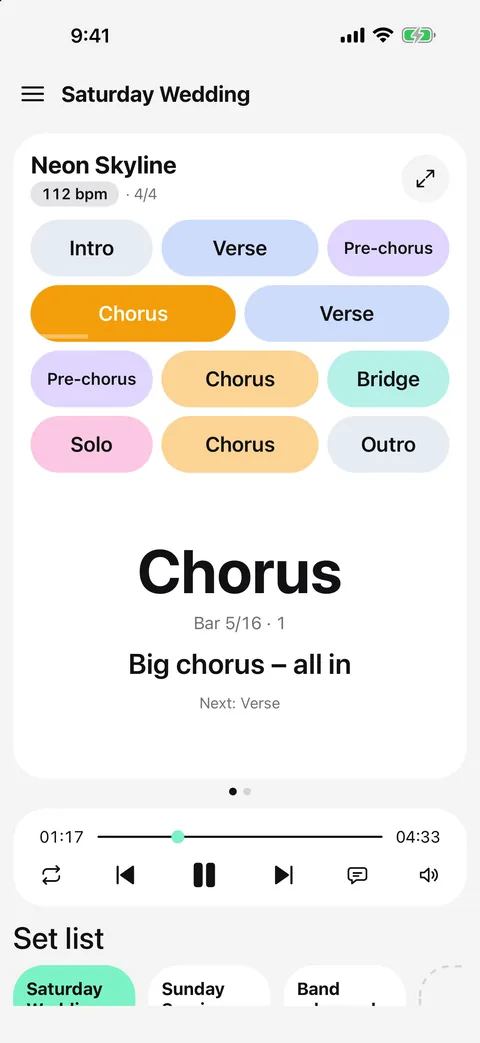
The count-in pill on the sections card shows both settings, for example “Count-in 1 · Section 1”. Tap it to change them.
- Song start: no count-in, or 1, 2 or 4 bars when you press play at the top of the song.
- Tapping a section: count in first (1, 2 or 4 bars), jump right away, or “Finish this section first”.
- With “Finish this section first”, tap the next section while playing: it's marked “Next” with a dashed outline and starts exactly when the current section ends.
- Tap the section you're in to repeat it; tap the marked section again to cancel.
Set lists can have their own count-in before the first song — see the set list guide.
Questions
Can the song start and a section jump have different count-ins?
Yes. Metronome Map 2 keeps them separate: for example no count-in at the song start, and two bars when you tap a section.
What happens if I tap a section while stopped with “finish this section first”?
There is no section to finish, so it counts in as usual.
Can I repeat the chorus on the fly?
Yes. With “finish this section first”, tap the chorus while it's playing and it plays again straight after.
Does it work in the notes view?
Yes. The same count-in settings are used on the home screen and in Notes.

Try it in Metronome Map 2
The metronome that follows your song: song map, cues and count-ins, AI beat grid and stems, notes that zoom and set lists. Free on Android; iPhone and iPad beta on TestFlight.